Context
FortiAIGate 8.0 is Fortinet’s platform for protecting AI traffic: prompt injection control, data exfiltration prevention and LLM response analysis. Its official deployment is delivered through a Helm chart on top of GPU-enabled Kubernetes, which requires orchestrating an EKS cluster, nodegroups with high-cost instances (g6, g5 or p4 families) and storage shared across pods.
I built this lab with three goals: gain deep product expertise, maintain a controlled environment for technical demonstrations and have a sandbox for offensive security research on AI workloads.
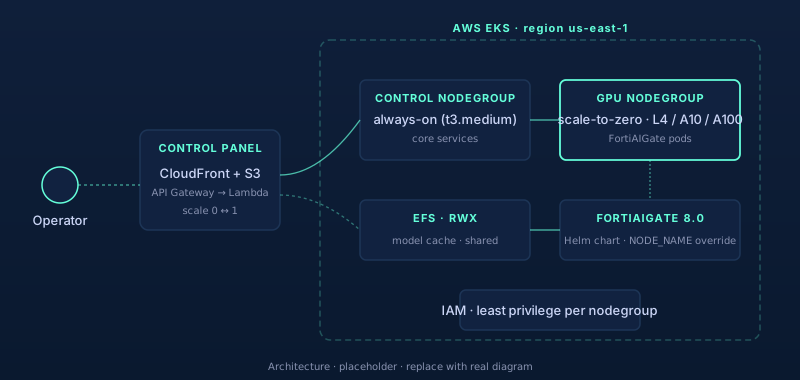
Architecture design
The environment is designed to come online only when needed and shut down automatically once the session ends:
- EKS cluster with two distinct nodegroups: a small one for always-on control components, and a GPU nodegroup that defaults to zero nodes.
- EFS as RWX storage for pods that share model caches, avoiding unnecessary duplication of EBS volumes.
- Official FortiAIGate Helm chart with a
nodeSelectortargeting the GPU nodegroup. - Custom control panel (CloudFront + S3 + API Gateway + Lambda) that scales the GPU nodegroup from zero to one on demand, with simple authentication.
The outcome: the GPU only incurs cost during actual usage hours, while the rest of the lab remains persistent and inexpensive.
Key technical decisions
Hostname-bound license
FortiAIGate’s license is tied to the pod’s hostname. By default, every time the nodegroup scales from zero to one, Kubernetes assigns a new hostname and the license becomes invalid. The fix was injecting NODE_NAME as a stable override, allowing the license to survive Stop/Start cycles without manual reactivation through FortiCare.
Affinity on stable labels
The Helm chart uses kubernetes.io/hostname by default for some affinity rules. After the first shutdown and restart, that label changes and pods remain in a permanently pending state. Replacing it with a nodegroup-level label that persists across scaling events fully resolved the issue.
Reusable control-panel pattern
The panel developed to start the GPU node consolidated into a pattern applicable beyond this specific lab. The same architecture can be reused for FortiEDR, analysis sandboxes and, in general, any EKS workload that consumes expensive resources on a per-session basis.
Lessons learned
- For cloud-native but compute-intensive Fortinet products, EKS combined with scale-to-zero nodegroups offers the optimal balance between cost and availability.
- The main challenge is not the initial deployment, but the operational lifecycle: ensuring clean shutdowns and consistent restarts without breaking licenses or losing state.
- A control panel designed specifically for the lab is more valuable than any generic dashboard, since it encodes specific operational decisions such as timeouts, scaledown sequences and alerts.
Next steps
I am consolidating this architecture into a reusable kit under the name “FortiAIGate-on-AWS in a box”, combining Terraform, Helm values and Lambda functions. The goal is for partners and customers to replicate the lab in their own accounts, reducing the process to a single provisioning command.